 QuickNovel

Write unlimited stories
Describe your idea and QuickNovel drafts the chapter. Keep going, rewrite a scene, or steer the plot with a short brief. Characters, tone and story so far carry into every new chapter.
Pick a genre, cast your characters and take the first chapter wherever you like. QuickNovel writes alongside you, remembers every chapter, and turns your story into a finished book.
Join a community of readers and writers turning ideas into finished books, right from their iPhone.
QuickNovel is an AI writing partner for fiction. Start from a one-line idea or a manuscript you already have, shape your characters and plot, and write chapter by chapter. The app keeps track of everything that has happened so far, so your story stays consistent from the first page to the last.

Looking for Story AI? You're in the right place. QuickNovel is its new name. On the App Store it's still listed as Story AI: Book Creator App.


Everything you need to go from a spark of an idea to a book you're proud of, without staring at a blank page.
Describe your idea and QuickNovel drafts the chapter. Keep going, rewrite a scene, or steer the plot with a short brief. Characters, tone and story so far carry into every new chapter.
Publish your book once it has three chapters, under your name or anonymously. Discover what other writers are working on, then rate and review the books you love.
Build characters with their own personality and voice, mix up to five genres, plan plot twists, and edit anything the AI writes. Your story, your rules.
Upload a PDF, Word, text or RTF file and keep writing from the last page.
Generate cover art from your characters and plot, then set the title and author.
KDP-ready paperback PDF, Kindle ePUB, reading PDF or plain text.
A distraction-free reader, plus narration that reads your chapters aloud.
QuickNovel tailors every story to your preferences and style, so the book feels like yours, not a template.
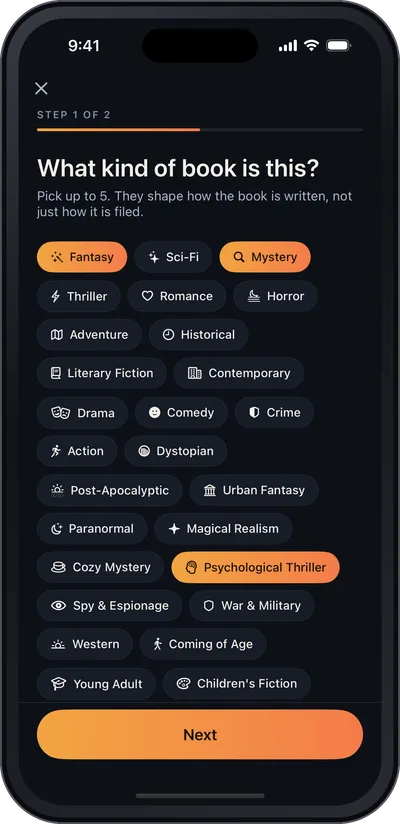
Pick up to five genres, describe your idea, and cast the characters who'll carry it.
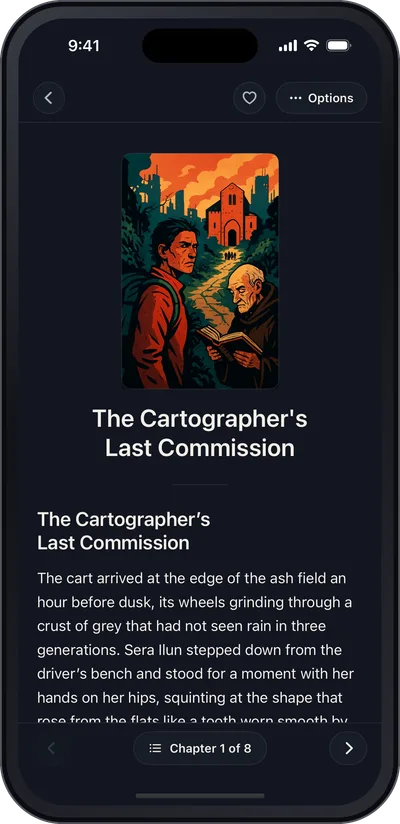
Generate, rewrite and steer each chapter. The app remembers the plot and every character's voice.
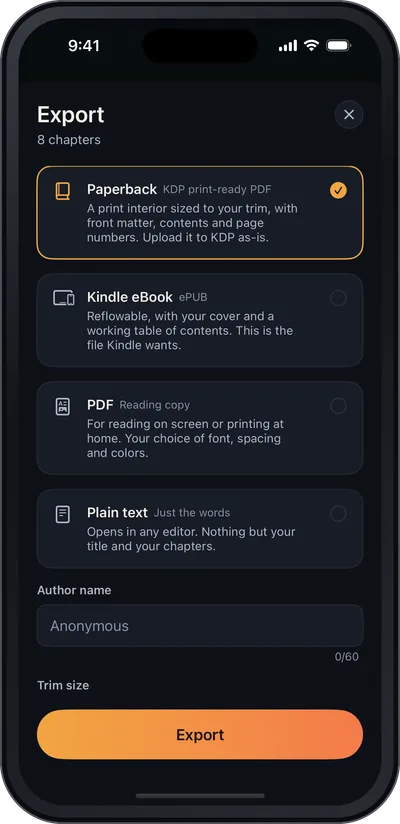
Share it with the community, or export a print-ready paperback or Kindle eBook.
Everyone has a story to tell. We build the tools that help them finish it.
QuickNovel is made by Brantley Media Group. We're driven by the belief that every storyteller deserves a way to unleash their creativity and share their story with the world.
Real App Store reviews from writers using the app (then called Story AI).
“The story app is amazing! It has helped me in creating new unique stories for my family, friends and myself! The stories get well written and they are easy to read.”
“I like this app, and enjoy using it for creative writing purposes. … I think this is a good app to use.”
“It’s great for creating little stories and getting some inspiration.”
Yes. QuickNovel is the new name for Story AI. It's the same app from Brantley Media Group, listed on the App Store as Story AI: Book Creator App, and your books and subscription carry over.
You do. Brantley Media Group claims no copyright in anything you write or generate with QuickNovel, and you're free to use, publish, or export your books as you see fit, subject to our Terms of Use.
Yes. Your books, characters, and prompts stay private by default. Only books you choose to publish to the community are visible to other subscribers. We don't use your writing to train AI models.
QuickNovel keeps a running summary of your book as it grows, along with your character sheets (names, personalities, dialogue styles and tones), so new chapters stay consistent with what has already happened. It updates automatically as you write, edit, or regenerate chapters.
Yes. Upload a manuscript in PDF, Word (.docx), plain text (.txt), or RTF format, up to 25 MB, and keep writing it in the app.
A KDP-ready paperback PDF for Amazon Kindle Direct Publishing, a Kindle ePUB, a plain PDF for reading, or a plain text file. Exports are made on your device.
QuickNovel offers weekly, monthly, and annual auto-renewing subscriptions billed through your Apple ID; the annual plan may include a 7-day free trial. Manage or cancel any time in iOS Settings › your name › Subscriptions. Refunds are handled by Apple at reportaproblem.apple.com.
Yes. Parental Controls are optional and off by default (You › Parental controls). Turning them on sets a 4-digit PIN, blocks flagged requests, and hides community books tagged Mature. Forgot the PIN? Email support@storyaiapp.com.
Questions about the app, your subscription, or a book in the community? Send a message below or email us directly.
Email us atsupport@storyaiapp.com